Creating an ideal desk setup is essential for maintaining focus and comfort throughout your workday. Whether you work from home or in an office, the way your workspace is arranged can significantly influence your productivity and physical well-being. In this post, we’ll explore practical tips to help you design a desk setup that promotes concentration and keeps you comfortable.
Why Does Desk Setup Matter?
Your workspace is where you spend hours each day. A cluttered or poorly arranged desk can lead to distractions, discomfort, and even physical pain. On the other hand, a well-planned setup supports your posture, reduces strain, and helps you stay engaged with your tasks. Investing time in arranging your desk properly is a simple way to improve work quality and your overall experience.
Ergonomics: The Foundation of Comfort
Ergonomics is the science of designing your workspace to fit your body and movements. Here’s how to apply ergonomic principles:
Chair and Desk Height
– Chair: Choose a chair that supports your lower back and allows your feet to rest flat on the floor. Adjust the height so your knees are at a 90-degree angle.
– Desk: The desk height should allow your elbows to rest comfortably at your sides, forming a roughly 90-degree angle when typing.
Monitor Placement
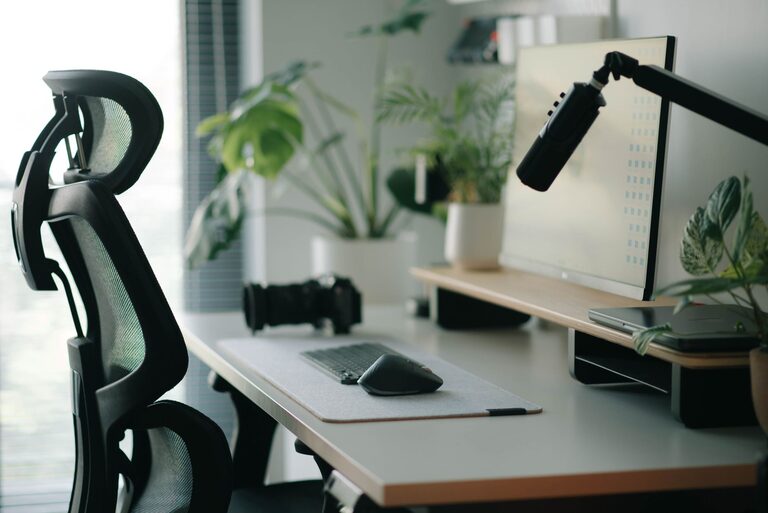
– Position your monitor directly in front of you, about an arm’s length away.
– The top of the screen should be at or slightly below eye level to avoid neck strain.
– Use a monitor stand or adjustable arm if needed to achieve the correct height.
Keyboard and Mouse
– Keep your keyboard and mouse close enough so your arms don’t have to stretch.
– Your wrists should be straight and relaxed while typing or using the mouse.
– Consider a wrist rest to reduce pressure on your wrists if you spend long hours typing.
Organizing for Focus
A tidy and well-organized desk can reduce distractions and improve your ability to concentrate.
Declutter Regularly
– Remove items you don’t use daily.
– Keep only essential tools and materials within arm’s reach.
Use Storage Solutions
– Utilize drawers, shelves, or desk organizers to store documents, stationery, and electronics.
– Label storage containers for easy access.
Limit Digital Distractions
– Keep your phone out of immediate reach or on silent mode during focused work sessions.
– Use browser extensions or apps that block distracting websites if needed.
Lighting: See Clearly, Stay Alert
Proper lighting reduces eye strain and helps maintain alertness.
– Maximize natural light by placing your desk near a window.
– Use task lighting, such as an adjustable desk lamp, to brighten your workspace without glare.
– Choose bulbs with a color temperature around 4000K to 5000K for a balanced, daylight-like effect.
Personal Touches: Comfort and Motivation
Adding personal elements to your desk can make your workspace more inviting and motivating.
– Incorporate plants to improve air quality and add a touch of greenery.
– Display items like photos or inspirational quotes that make you happy.
– Use ergonomic accessories like a footrest or a seat cushion for added comfort.
Breaks and Movement
No desk setup can replace the benefits of regular breaks and movement.
– Stand up and stretch every 30 to 60 minutes.
– Consider a sit-stand desk or adjustable workstation to alternate between sitting and standing.
– Practice simple exercises or posture checks during breaks.
Final Checklist for Your Desk Setup
– Ergonomic chair with adjustable height and lumbar support
– Desk at the right height for comfortable typing
– Monitor positioned at eye level and arm’s length distance
– Keyboard and mouse close and aligned to reduce wrist strain
– Adequate lighting without glare
– Organized and clutter-free workspace
– Personal touches to boost mood
– Plan for regular breaks and movement
By paying attention to these details, you can create a desk environment that helps you stay focused and comfortable throughout your workday. Small changes can make a big difference in your productivity and well-being.
—
With these desk setup tips, you’re well on your way to a workspace that supports both your focus and comfort. Try implementing one or two suggestions at a time and notice how your work experience improves. Happy organizing!
About the Author